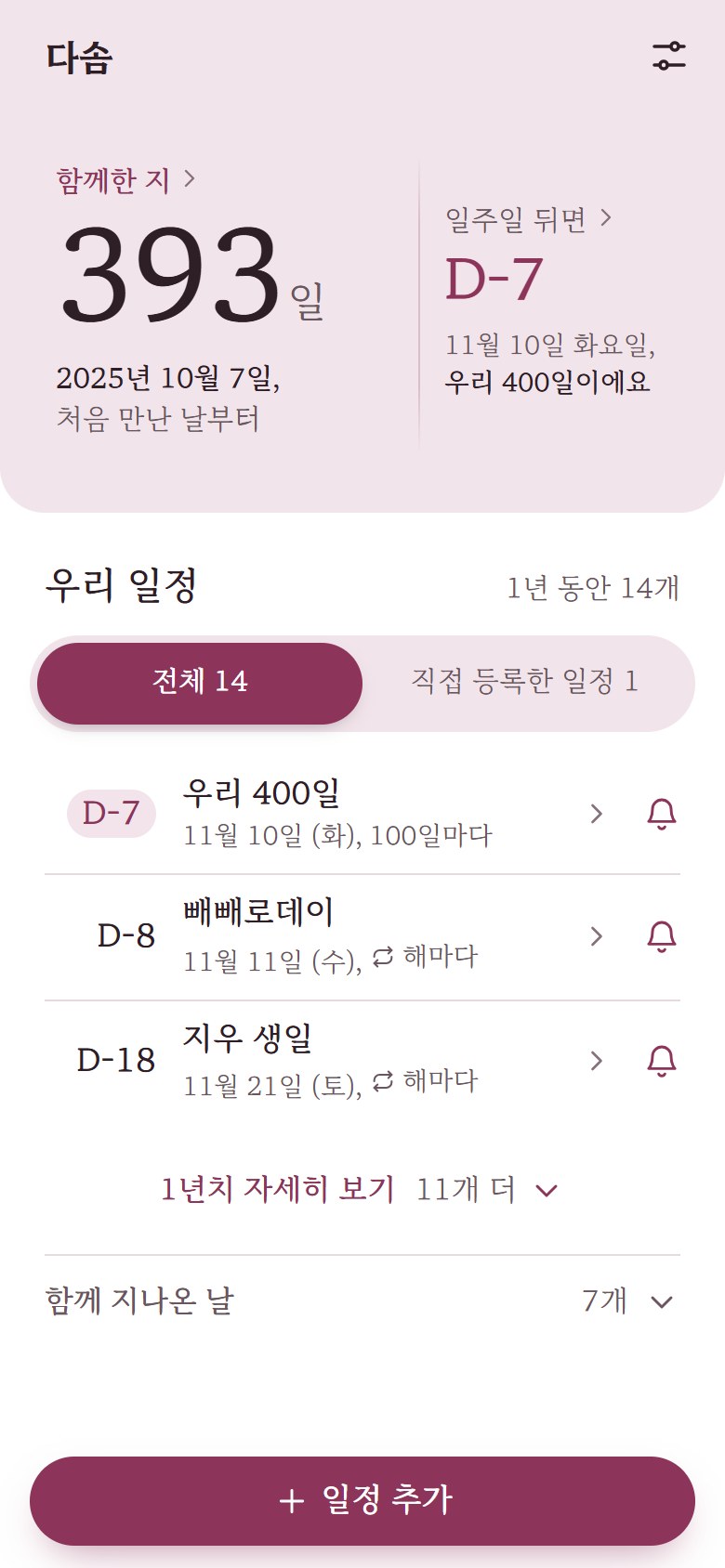
An example of the Dasom home screen (in Korean) as of November 3, 2026.
393days
The day you met is day 1
If you met on October 7, 2025, then November 3, 2026 is day 393 together. Just tell Dasom the date, and it recounts which day today is, every day.
Tap “Together” on the home screen to count the other way too: which day a past date was, or when your 1,000th day will be.
Days Dasom keeps
No need to write each one down. Four kinds of days gather in one list by date, and you can see the year ahead at a glance, grouped by month.
Days counted from the day you met
Just tell Dasom the day you met, and it counts your 10th and 50th days, every 100 days, and each yearly anniversary. Past anniversaries stack up in “Days behind us.”
10 days
50 days
100 days
200 days
300 days
1st anniversary
2nd anniversary
Both your birthdays
Each of you adds your own birthday, and it shows in your partner’s list too. Pick the day you were born, just like the day you met, and Dasom also counts which birthday it is and your age.
Days we celebrate
Seven days couples often celebrate are already in your list. You can turn off the ones you skip, one by one, in Settings.
New Year’s DayJan 1
Valentine’s DayFeb 14
White DayMar 14
Pepero DayNov 11
Christmas EveDec 24
ChristmasDec 25
New Year’s EveDec 31
Days you add
Add days that are just yours, like a trip, a move, or going back to the first restaurant you tried together. A short note shows who added each one.
The list as of November 3, 2026
D-7Our 400th dayTue, Nov 10 · Every 100 days
D-8Pepero DayWed, Nov 11 · Yearly
D-18Jiwoo’s 27th birthdaySat, Nov 21 · Yearly
D-28Jeju tripTue, Dec 1 · Added by you
D-51Christmas EveThu, Dec 24 · Yearly
The same days, your own notifications
You share the dates, and each of you sets your own notifications. If you change yours, your partner’s stay the same.
Together
Shared
The day you met
The “Our days” list and who added each day
Both your birthdays
The nicknames you call each other
Turning days we celebrate on or off
Undoing a deleted day within 10 minutes
Just for me
Only me
When to notify me: a week before, the day before, on the day
A different time for each (at first, 9 AM a week before and the day before, and midnight on the day)
What notifications say: the nickname you chose, the name your partner set, or titles hidden on the lock screen
Turning off notifications for any day
One day pinned to the top of your home
Whether this phone gets notifications
Dasom · 9:00 AMOur 400th day is tomorrow.
Example notification: Our 400th day is tomorrow. Notifications for the same day and time are bundled into one.
Your days stay between you two
We collect only what we need to count your anniversaries, and delete it as soon as you stop.
No ads, no visitor analytics
We show no ads and use no analytics tools that track your visits.
We don’t open your photos, contacts or email
From Google or Kakao, we receive only the basic profile and email needed to sign in.
Your partner can’t see your email
Your partner sees only your Dasom name, nicknames, and the dates you share. Only you see your notification settings.
Delete your account, and it’s gone
When you delete your account in Settings, your account, birthday and notification settings are erased right away.
No need to create a separate username or password.
Tell us the day you met
You can add your birthday too. It’s fine to add it later.
Invite your partner and allow notifications
Invite them via KakaoTalk or a link. Once they join, you see the same days together.
Frequently asked questions
Is it free?
Yes. Signing up, sharing dates and notifications are all free.
Can I use it before my partner joins?
Yes. You can add the day you met and other days on your own first. When you later get an invite, you can preview and choose which days to bring along.
Can I keep photos too?
Dasom focuses on dates and notifications. For photos, keep using the shared album you already have.
If my partner turns off notifications, do I stop getting them too?
No. Each person sets notifications separately. Notifications your partner turns off are off only for them.
Do notifications work on iPhone?
On iOS 16.4 or later, open Dasom in Safari, choose “Add to Home Screen,” and open Dasom from your Home Screen. Then you can get notifications.
How do I get notifications on Android?
Open Dasom in Chrome or Samsung Internet and allow notifications under “This phone” in Settings. If they don’t arrive, follow the checklist in Help.
What does Dasom do with my birthday?
Pick the day you were born, year included, and Dasom reminds you every year and counts which birthday it is and your age. The birthday you add is visible to your linked partner. Adding a birthday is optional.
How do I remove days we don’t celebrate?
Turn them off one by one under “Days we celebrate” in Settings. A day you turn off disappears from both your lists. To turn off just its notification, tap that day’s bell in the list.
How do you handle my information?
What we collect, why, and when we delete it are all in our Privacy Policy.